This is the second post in my series on smart home technology. You may want to start with the one entitled Smart Home Starting Point.
{Disclosure: I’m providing links for these products. If, at the time of publication, the price was the same on Amazon and elsewhere, I linked to Amazon and I may get a couple of pennies in referal fees. But, Amazon doesn’t always play well with others- like they won’t list certain Google products, and they won’t show Sonos speakers that compete with Alexa. In those cases, I’m linking directly to the product page. I care a whole lot more about giving good advice than getting a couple of pennies from Seattle. Thx}
- Starting Point
- HVAC/ Thermostats
- Lighting
- Doors and Locks
- Smart Appliances
HVAC Thermostats
One of the first IOT devices we chose was the thermostats (in part because we had to install something to control our new furnaces and AC units). We’d worked with Nest thermostats in our house in California, and found them to be very good, even before Google acquired the company. That was a quick no-brainer.
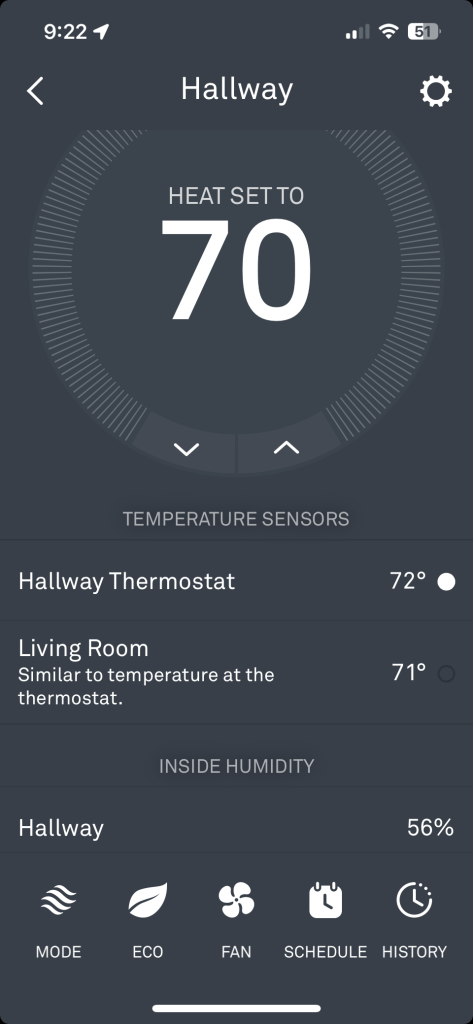
For the rental units, we go with the standard Nest Thermostat. It’s easy to install, and does what you tell it to do. It’s great for setting a schedule, which can significantly reduce heating and cooling costs. It also provides remote access, so our tenants can change their thermostat remotely. We often dial down the thermostat when we’re away to save energy and be a bit more eco-friendly. Then when we land at the airport coming home, I’ll remotely log in and bump the thermostat back to our comfort temp. Winner!!
In my own home, I have the Nest Learning Thermostat. In theory, it will “learn” from your habits- figuring out when to turn up the heat, etc. This is fine if you lead a very predictable life (kids always come home from school at 3:30pm, etc.) For us, though, it was easier to just program the times and temps manually, and then teach it that if we all leave the house, then dial back the heating/ cooling. One thing we really love, though, is the support for remote sensors. The thermostat that controls the second floor in our house is in the master bedroom. Most of the time, that is great. However, my wife works from home, and her office can get a bit warm from the afternoon sun. This version of the Nest thermostat can check in with a remote sensor in the office to decide whether to fire up the furnace or AC unit. The rest of the time, it makes that decision based on the temperature in the master bedroom.
Worth noting though, that smart thermostats aren’t universal. I have one rental property with an old-school steam boiler. We followed all of the instructions to the letter, but the thermostat only worked for about 2 months. Then I had to switch over to an ecobee thermostat, which my HVAC team assured me plays better with boilers. We haven’t had a problem with that unit since, but it was annoying to have to make the switch.
In addition to the Nest Thermostats, there’s one other IOT device we use. Govee makes temperature and humidity data loggers. This allows us to keep track of remote parts of the house, and also to watch how it behaves over a period of time. We keep one sensor in the basement, one in the kitchen, and one in the crawl space. This is particularly useful because Govee’s service will notify my phone if the temp or humidity fall outside of a range I can configure.


One more toy…
There’s one more tech tool that is worth mentioning. Although it isn’t actually connected to anything else, I’d be lost without my FLIR infrared camera. This device attaches to my phone, and shows me an infrared picture of what is hot and cold. This is invaluable for looking at cold spots and finding flaws in our insulation. It’s incredibly simple to use. Like so many tools, a few years ago this type of tech was only available to professionals. Now, it’s as simply as ordering it online and plugging it in. A definite game changer for us.

So…. that’s our first IOT devices connected to our home system. What’s more important than to be comfortable in one’s own home? I’m happy to answer any other heating/ cooling questions you may have have. I’m happy to dive deeper, or press on to the next IOT conversation. Leave comments below!


Hi Doug,
I enjoyed your first two posts about smart home technology and looking forward to more, especially Lighting, and Doors and Locks.
Your comments about “interoperability” (not tied to a single brand) resonated.
Years ago I went with Insteon (and bought their hub) in order to set up front porch and driveway lighting. Mine was a very simple setup, but it gave me the option of having outside lights come on at sunset (+ some set amount of time) and then turn off at a designated time (~11pm). The primary point of my simple setup was to illuminate the walking path for our tenants after dark.
Then, Insteon (the company) went belly up. Interestingly enough, my Insteon Hub still turned on/off lights as programmed, but I was no longer able to add devices or modify the program. Then, a group of investors bought Insteon and brought it back to life, but for a monthly (or annual fee). The fee is the same whether you are controlling one device or 100. In my case their subscription cost seems prohibitive ($) for a setup as simple as mine, but I may need to bite that bullet if I can’t find an economical alternative…
Dave
>
LikeLike
definitely stay tuned. We’ve done a *lot* with lighting automation, both indoors and outdoors. I’ll get to that one shortly!
LikeLike